









Documentation Index
Fetch the complete documentation index at: https://docs.qontext.ai/llms.txt
Use this file to discover all available pages before exploring further.
Overview
In Qontext, a Context Vault is the core container where you bring together company knowledge scattered across many different tools. Qontext continuously structures and links that information into a living context graph that your AI workflows can query at runtime, so the AI gets relevant, up-to-date context without you manually setting it up for every new tool or use case. Practically, a Context Vault is where you:- Define the scope: Company-wide, team-specific, or use-case-specific.
- Connect and sync data sources: Updates in the source are reflected in the vault.
- Retrieve context: Via API, MCP, or workflows (n8n, Make, Zapier, custom agents), using one vault as the shared context foundation.
Usage
How to set up a Context Vault in the platform

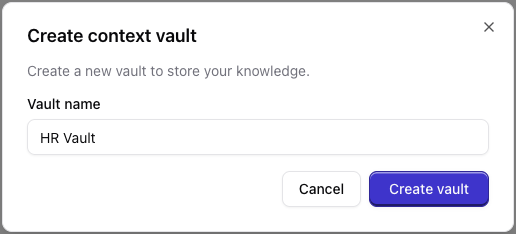
(Optional) Configure ingestion and retrieval instructions at the vault level. For more information, see System Instructions.
Create an API key to ingest and retrieve any data
Ingest the first data into the vault (see Data Sources for details).
Link your AI tools (see Context Access for details) to Qontext to ensure the generated output is always up-to-date and fully aware of the important company knowledge.
Behind the scenes: how vaults are built and updated
When you ingest data into a vault, Qontext automatically organizes it into context-rich relationships and turns it into a context graph so retrieval can be relationship-aware and relevance-ranked. This intelligence layer makes Qontext retrieval smarter by design, and the process runs entirely in the background with no setup required. How it worksEntity extraction
Detects key entities like people, companies, and concepts.
Relationship mapping
Connects related entities across your data sources.
Graph construction
Builds a context graph that reflects real-world relationships.
Continuous updates
Keeps your context current as new data is ingested.
- Reflects relationships, not just keywords.
- Preserves semantic meaning across tools.
- Stays accurate and current over time.
- Enables more intelligent context retrieval.
Best practices
Prefer one vault when possible.A unified vault provides the AI a holistic view, but separate vaults are necessary for strict access control, varied instructions, or compliance-driven data isolation. Prioritize a centralized structure unless security requirements or team-specific scopes demand fragmented environments.
Personal vs Organization workspace.Choose your personal workspace for individual use cases and private context that remains isolated from the team.Use your organization’s workspace to centralize shared data sources, manage collaborative API keys, and maintain governed context across team workflows.
FAQ
How many vaults can I have?
How many vaults can I have?
While you can create multiple vaults for different teams or use cases, we recommend a holistic approach with fewer, larger vaults to give your AI a unified perspective. Create separate vaults only when sensitive data requires strict isolation or when a specific use case demands completely different system instructions.
Can I move data between vaults?
Can I move data between vaults?
Data is ingested into a specific vault. To “move” context, you would ingest the same or updated content into another vault; there is no built-in copy-between-vaults operation.