

Overview
Version history shows how a file changed over time. Use it to understand when a file changed, where the change came from, and which version is currently active. Version history is available from the Version history dropdown in the editor top bar.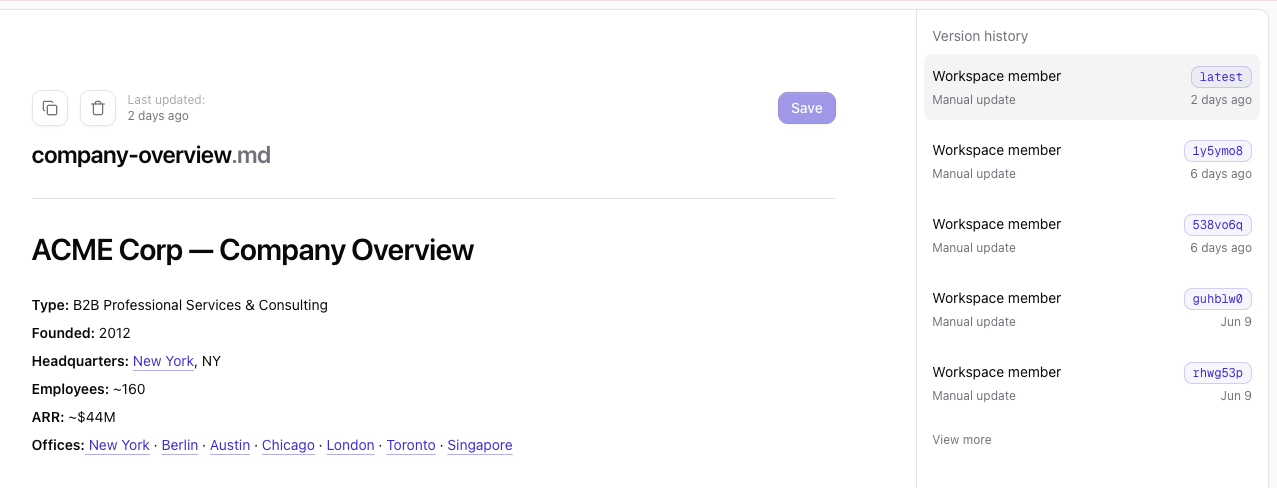
Version entries
Each entry represents one version of the selected file. A version entry shows:- Source: Where the change came from, such as a connected source or workspace member
- Change type: Whether the change was automated or a manual update
- Version: Either
latestor a short version identifier - Timestamp: When the version was created
Change types
Automated change
An automated change is created from connected source data. For example, Qontext may update a customer file after new CRM activity, new documentation, or other connected source changes.Manual update
A manual update is created through the Qontext platform, MCP, or API. For example, a user or agent may create or update a file directly in the context repository.Viewing previous versions
Select a version from the list to inspect that version of the file. Previous versions are shown in read-only mode, so you can review historical content without changing the current file. To return to the current file, select the version markedlatest.