

Overview
Connect Zendesk to sync support tickets and published Help Center articles. Synced records are available to context agents; continuous updates can use them to maintain files in the context repository. Qontext only reads Zendesk data. Access is limited to what the connected Zendesk account can read.
Draft articles and article comments are not yet supported.
Recommended setup
Use a dedicated Zendesk account with access to the tickets and Help Center sections that should be synced. This keeps the connection independent of an individual employee’s account. Qontext requests the OAuth read scope. The account’s Zendesk permissions still determine which records and internal comments are available.Setting up the connection
1
Open Sources
In the Qontext app, go to Sources, select + Connect data source, then choose Zendesk.
2
Connect a Zendesk account
Reuse an existing connection or enter a Credential name and select Add new credential. For a new connection, enter the Zendesk subdomain, select Continue to Zendesk, then sign in and authorize access. Back in Qontext, select Continue.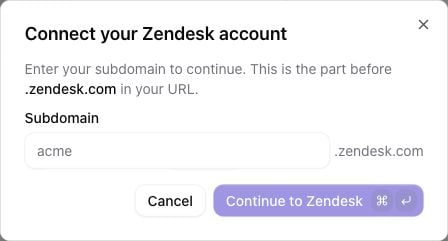
3
Choose what to sync
Enable Tickets, Help Center Articles, or both, then set the filters described below.
4
Set sync frequency
Choose how often Qontext should check for new and updated content.
5
Choose access
Choose Only you or Everyone before Review & Create. Source permissions control who can manage the connection and read its synced data.
6
Review and create
Review the settings and select Complete to create the source and start the initial sync.
Filtering what gets synced
New sources include tickets and Help Center articles by default. At least one content type must remain enabled.Tickets
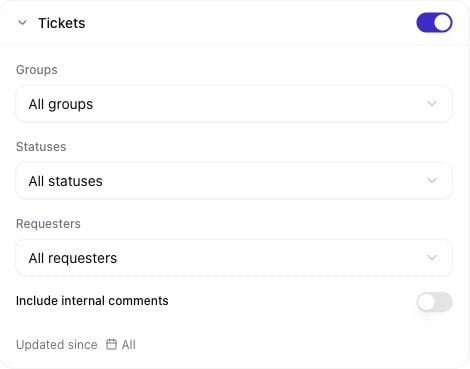
- Groups: limit tickets to selected Zendesk groups.
- Statuses: choose New, Open, Pending, Hold, Solved or Closed.
- Requesters: include tickets from selected requesters.
- Include internal comments: add internal notes the connected account can read. This is off by default.
- Updated since: include tickets updated on or after the selected date.
Help Center articles
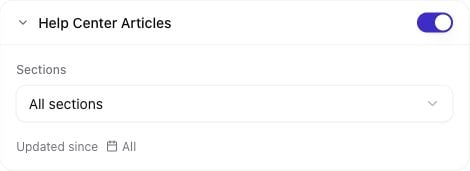
- Sections: limit articles to selected Help Center sections.
- Updated since: include articles updated on or after the selected date.
Managing permissions
Zendesk permissions limit the content Qontext can fetch. Qontext source permissions separately control who can manage the source and read its synced records.Sync latency
Initial sync time depends on the selected content volume and Zendesk API limits. Later syncs process new and updated records incrementally. Check sync progress and logs from the source in Sources.FAQ
Why are some tickets or articles missing?
Why are some tickets or articles missing?
Check the connected account’s Zendesk access and the source filters. Article sync includes published content in the Help Center’s default locale. When filters are widened, select Resync all data in the source’s Syncs tab to include older matching records.
Are internal ticket comments included?
Are internal ticket comments included?
Only when Include internal comments is enabled and the connected Zendesk account can read them. Public replies are included by default.
Does Qontext change anything in Zendesk?
Does Qontext change anything in Zendesk?
No. The connection uses read access and does not create, edit or delete tickets or articles in Zendesk.